Setup
Connect your Amazon account
How AdsPlane connects to Amazon Ads, what access it uses, and how your credentials are stored.
AdsPlane connects to your Amazon Advertising account through Amazon's official OAuth flow. You authorize access once; AdsPlane never sees or stores your Amazon password.
Connecting (hosted plans)
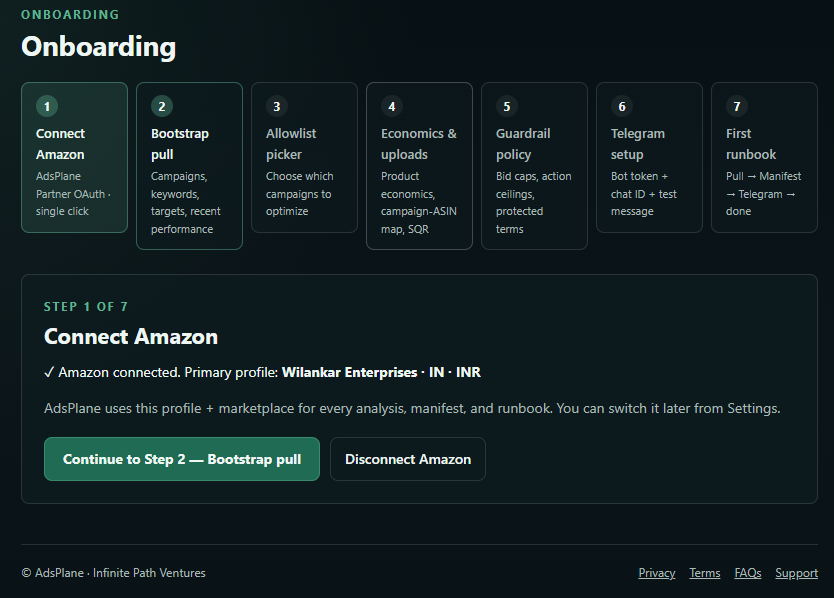
- In the dashboard, open Connect Amazon and click Authorize with Amazon.
- Sign in to Amazon and approve the requested Advertising API access. You'll be returned to AdsPlane automatically.
- Pick the profile (marketplace / region) you want to manage. Your plan sets how many accounts and marketplaces you can connect.
- Choose the campaigns for your allowlist — only allowlisted campaigns are ever pulled or acted on.
Once connected, AdsPlane pulls a short window of historical data to establish a baseline, then runs the daily Runbook on your schedule.
What access AdsPlane uses
AdsPlane reads your campaign, keyword, search-term, and placement reports, and — once you approve a Manifest — applies bid, budget, pause, and negative changes through the Amazon Ads API. It only ever touches campaigns on your allowlist.
How your credentials are stored
- Your Amazon refresh token is encrypted at rest. On hosted plans it lives in an encrypted secrets vault; on Free Local Lite it stays in a local encrypted vault on your own machine.
- Short-lived access tokens are held only as long as needed and are never stored permanently.
- Credentials never appear in logs, reports, CSV exports, Manifests, Telegram messages, or the Execution Ledger.
You can disconnect at any time from the dashboard, which revokes AdsPlane's access.
See also: Installing Free Local Lite for the local-only option, and our Security page for the full posture.